The skip-to-content link allows keyboard and screen reader users to bypass the header and navigation elements and jump directly to the main content area. This feature is especially valuable for users who navigate sequentially through page elements.
When enabled, a "Skip to main content" link appears as the first focusable element on the page. The link is visually hidden until it receives keyboard focus, at which point it becomes visible.
To Enable the Skip Navigation Link
- Open your project in ePublisher Designer.
- Select your WebWorks Reverb 2.0 target.
- Open Target Settings (right-click the target and select Target Settings, or press F6).
- Navigate to Accessibility in the settings list.
- Set Add link to skip navigation content to Enabled.
- Regenerate your target to apply the changes.
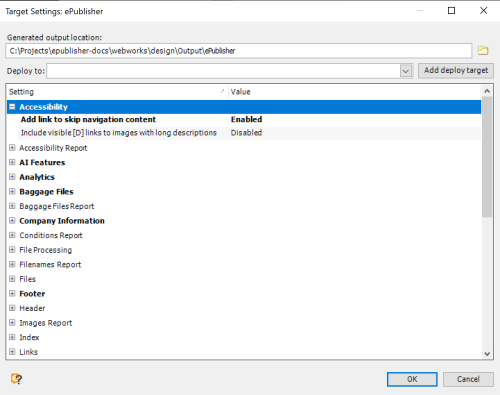
Note: The skip navigation link is disabled by default. If your output does not display this link, verify the target setting is enabled.
Last modified date: 06/23/2026